One noun replaces two. Slack's model, finished.
The team asked for automation a Slack user can translate on sight. So we adopt Slack's Workflow Builder model wholesale — triggers, steps, forms, variables, buttons, branches — and finish it where Slack's version is documented to break. Routines don't compete with Workflows; they become one trigger type. A Routine was always a workflow that starts on a schedule.
platform-definition.md §7: Routine (= playbook in code = workflow in the data model). The durable, journaled engine — replay-on-resume, restart-surviving approvals — is complete and named a defensible IP pillar (§4). This rename aligns the UI with the code, not against it. Zero engine work. The build is an authoring surface — which is exactly what Slack's Workflow Builder is.
How Slack's Workflow Builder actually works.
Faithfully, before we improve anything. A Slack workflow is one trigger plus up to 100 sequential steps, built in a no-code canvas, published to a workspace. This section is the part a Slack-fluent teammate should be able to nod along to.
From a link
A shareable button; only works clicked inside Slack.
From a webhook
External events start the workflow with a payload.
On a schedule
Dates, times, cadences.
Message is posted
Keyword match — in one chosen channel.
Person joins channel
Fires per join, per channel.
Emoji reaction used
A specific emoji, in a specific channel.
List item updated
Fires when a Slack List changes; optionally per field.
Connector triggers
Third-party events — a Salesforce record updates, a GitHub issue opens.
Slack steps
Send a message, send a form, add to channel, delay, set variables. Available to everyone.
Connector steps
~70+ apps — Google Sheets "Add to spreadsheet," Zoom "Create a meeting." App approval may apply.
Custom steps
Org-specific actions a developer builds with the Deno Slack SDK and deploys via CLI.
| Machinery | What it does |
|---|---|
| Forms | Collect structured input from the person who ran the workflow. |
| Variables | Data flows step to step — "insert a variable" anywhere downstream (who triggered it, form answers, connector output). |
| Buttons | Pause the workflow until clicked. Custom text and color, single-click mode, restrict-to-people, expiration dates. |
| Branches | Conditional paths — up to 15 conditions per branch. |
| AI step | "Generate AI Response" — a plain-language prompt plus attached knowledge sources (channels, canvases, lists, files). Writes text: summaries, translations, drafts. Slack also generates whole workflows from a description. |
| Governance | Workflow managers (edit, unpublish, delete) · publish flow · who can find, use, copy · admin dashboard of published workflows · in-app activity logs. |
| Pricing | Paid plans only. Workflows with custom functions or 2+ connector steps are "premium" — usage-billed past a monthly run allotment. |
Twelve places the builder breaks down.
These aren't our opinions — they're the documented complaints of reviewers, and the exact feature list of WorkflowBuddy, a third-party project that exists only to patch Workflow Builder's holes. Each gap gets an ID; the rest of this document answers them by name.
| ID | Gap | Consequence |
|---|---|---|
| G1 | No step-level testing | The only way to test a workflow is to run it — live, against real channels and real tools. |
| G2 | One trigger per workflow | The same five steps behind a schedule and a button = two workflows to keep in sync. |
| G3 | Single-channel scope | Channel-scoped triggers bind to one channel. Ten channels = ten copies. |
| G4 | <100 connectors | Zapier has thousands. If the app isn't on the list, the workflow ends at a webhook. |
| G5 | No loops | "For each client…" cannot be said. Steps are duplicated per item, by hand. |
| G6 | Weak failure handling | A failed step ends the run. No retries, no resume, notifications are thin. |
| G7 | Logs aren't exportable | Activity is viewable in-app only — nothing for audits or debugging offline. |
| G8 | No versioning | Editing a published workflow is destructive. In-flight runs and pending buttons can be orphaned. |
| G9 | Coarse delays | Delays tick in minutes; "wait until they reply" doesn't exist. |
| G10 | One-way only | Workflows push outward. Nothing watches the other system and syncs back. |
| G11 | Complexity cliff | Easy at 4 steps, unmanageable at 40 — a flat list with no abstraction. |
| G12 | Premium billing surprises | Add a second connector step and the workflow silently changes billing class. |
Every Slack word, translated.
The rule: keep Slack's name unless our surface genuinely differs. A Slack admin should be able to rebuild their workflows here without learning a new language — and notice, term by term, where ours goes further.
| Slack says | ai.com says | What changes |
|---|---|---|
| Workflow | Workflow | Same noun, deliberately. One trigger becomes up to five. G2 |
| Workflow Builder | The Builder | Same canvas — but describing the workflow in English is the primary door in. |
| Channel | Room | Triggers can watch one Room, several, or the whole workspace. G3 |
| Slack steps | Workspace steps | Same set — plus Wait (until a condition) and Loop. G5 G9 |
| Connector steps | Connector steps | Same idea, honest count: 13 connectors today vs Slack's ~70+. G4 |
| Custom steps | App steps | Built by describing a Skill in chat — App Builder, no SDK, no deploy, no paid gate. |
| "Generate AI Response" | Agent step | Slack's AI writes text. Our agent acts — tools, connectors, a budget, and success checks, verified by the maker/checker. G4 G10 |
| Button | Checkpoint | Same pause, different guarantee: journaled, survives restarts and edits, expiry escalates instead of vanishing. G8 |
| Form | Form | Unchanged. |
| Variable | Variable | Unchanged — {{client.name}} flows step to step. |
| Branch | Branch | Unchanged, no condition cap worth advertising. |
| (no equivalent) | Test run | Reads execute, external writes are stubbed — see exactly what would have been sent. G1 |
| Activity log | Run history | Per-run status, checkpoint decisions, verified strips — and it exports. G7 |
| Workflow manager | Workflow manager | Unchanged. Publish flow, find/use/copy permissions — unchanged. |
| Premium workflow | (retired) | No billing classes. Runs meter against pooled credits, estimated before they run. G12 |
| Slack Connect use | (out of scope) | Cross-workspace workflows are not in this pass; installable templates are the nearest story. |
Slack's actual UI, next to ours.
Product screenshots from Slack's own pages — the Builder as it actually looks and navigates — each paired with the ai.com equivalent. Read the left side as the muscle memory we inherit, the right side as what changes. All Slack imagery © Slack / Salesforce, cited for internal comparison.
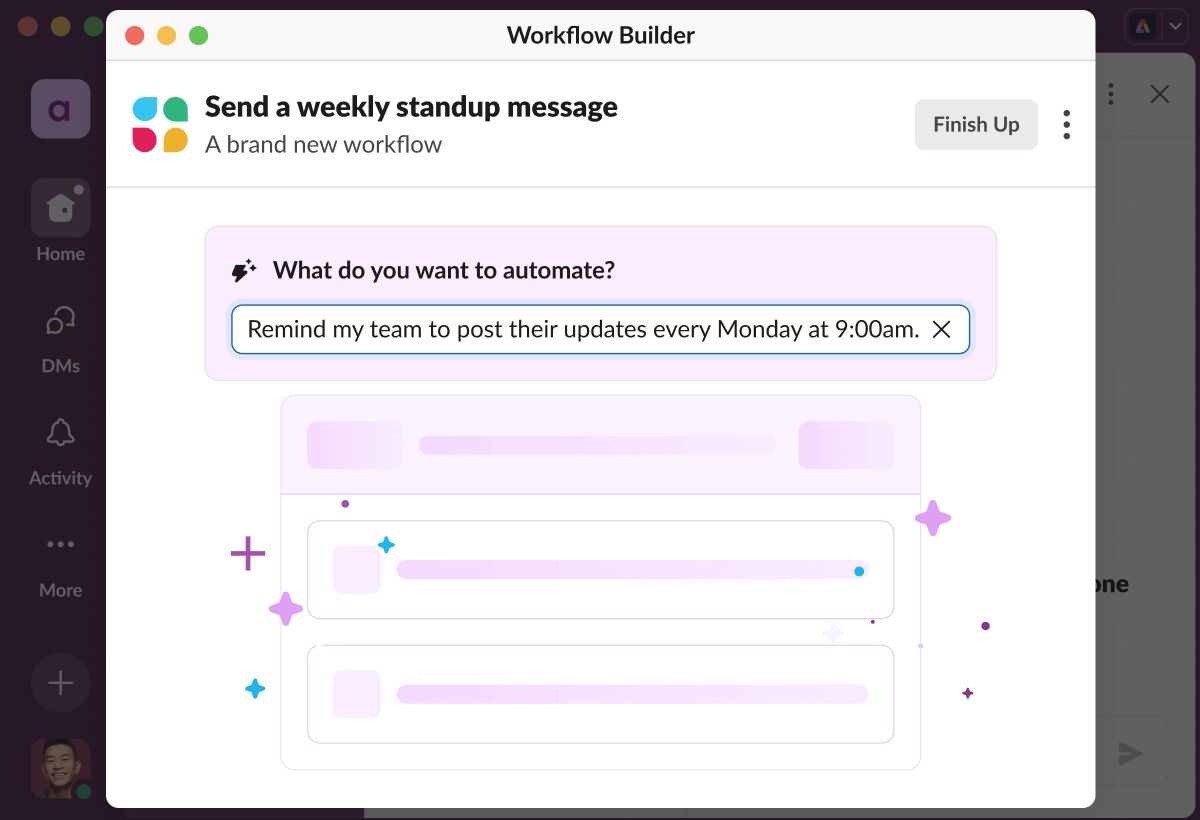
Workflows live in an app-level surface, one modal window deep. Runs speak as a bot; activity stays inside the Builder; the workflow is a place you visit.
No separate surface to find. The Builder is a conversation that compiles to a contract; runs, checkpoints, and history come to you where you already are.
Both products now open with a sentence. The difference is what the sentence buys you: Slack drafts a workflow, then drops you back into form-based editing. Here the compiled plan is the interface — steps, sources, checkpoint, test run, all before anything real happens.
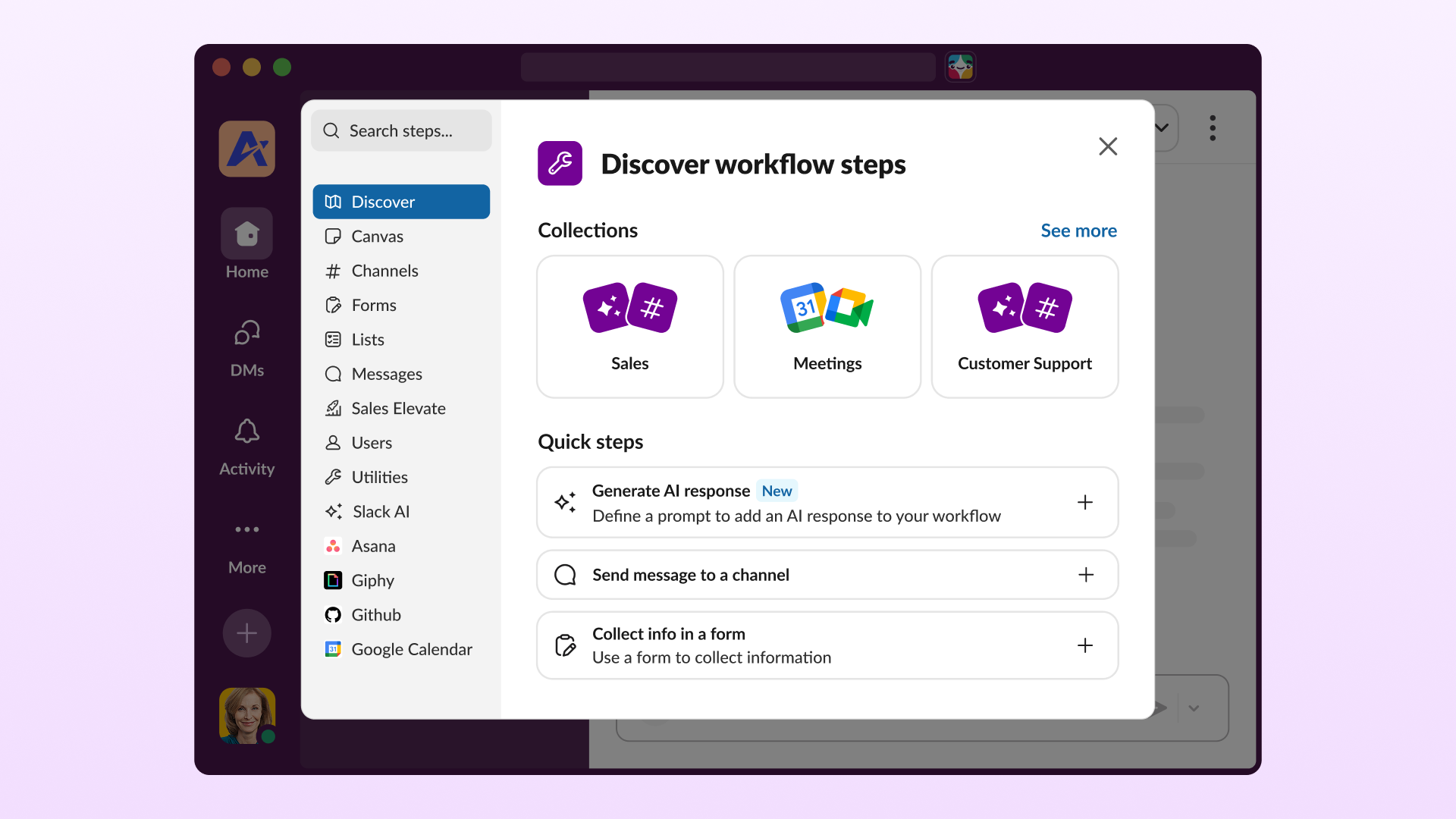
Slack's "Discover workflow steps" panel is genuinely good IA: search, collections, quick steps, then apps. We keep the shape and change the contents — two of our four categories don't exist there.
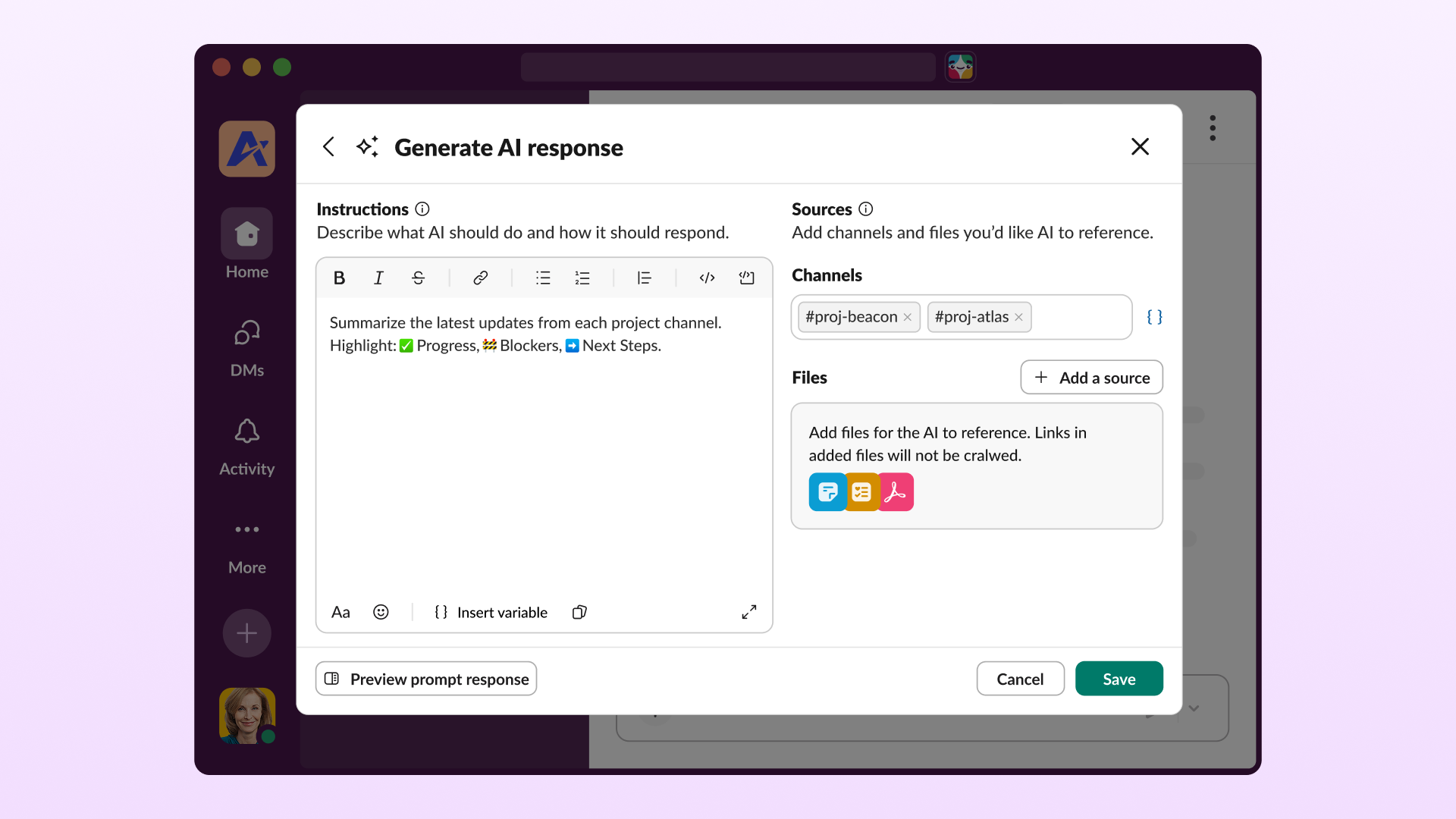
This is the sharpest single difference, visible in the config panels themselves. Slack's AI step takes instructions and sources and returns text. Our Agent step takes a sub-goal and returns verified work.
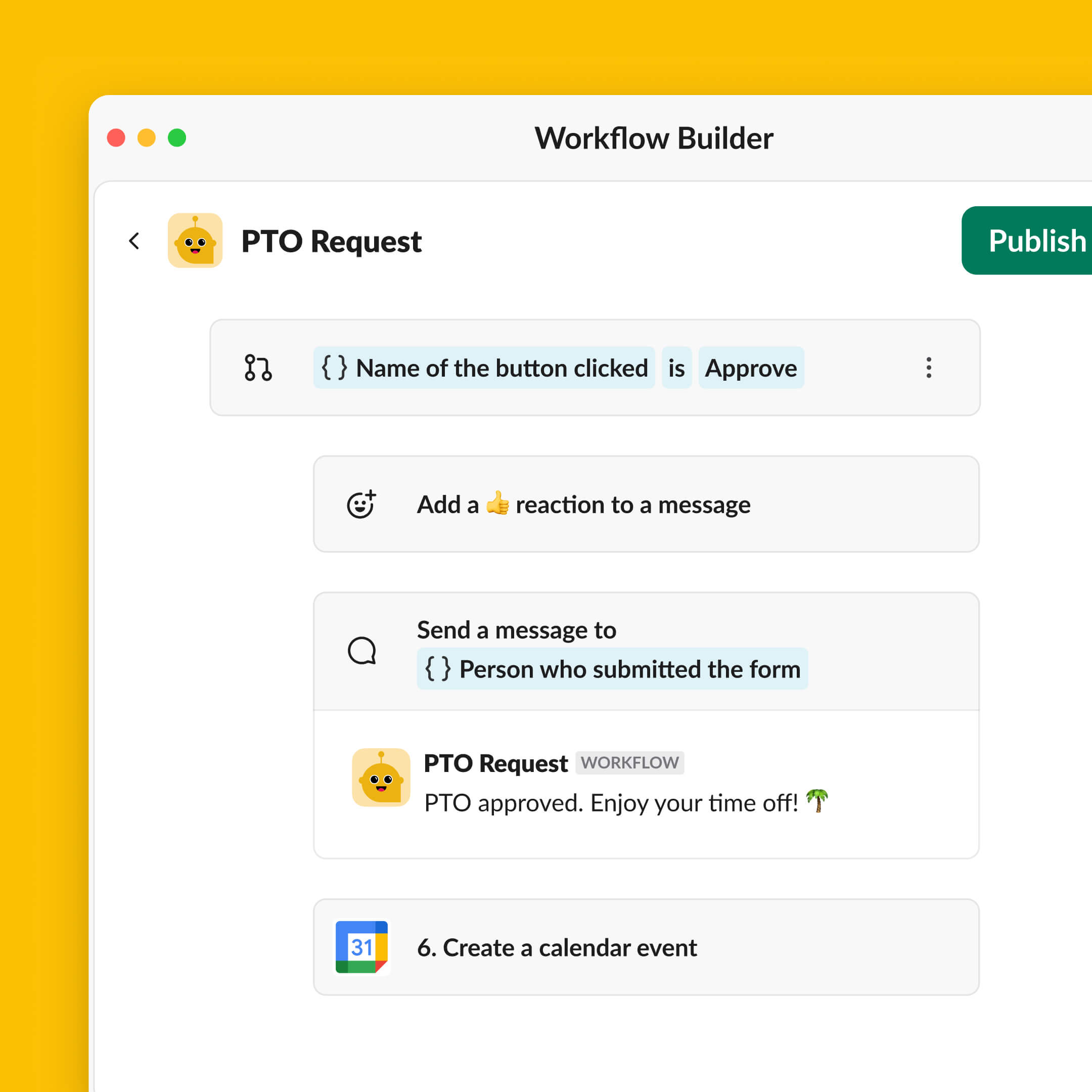
Slack's canvas is clean and we deliberately keep its reading rhythm: condition pills, variable chips in blue, step cards in a column. Three things are missing from theirs — a loop, an actor, and a pause that survives.
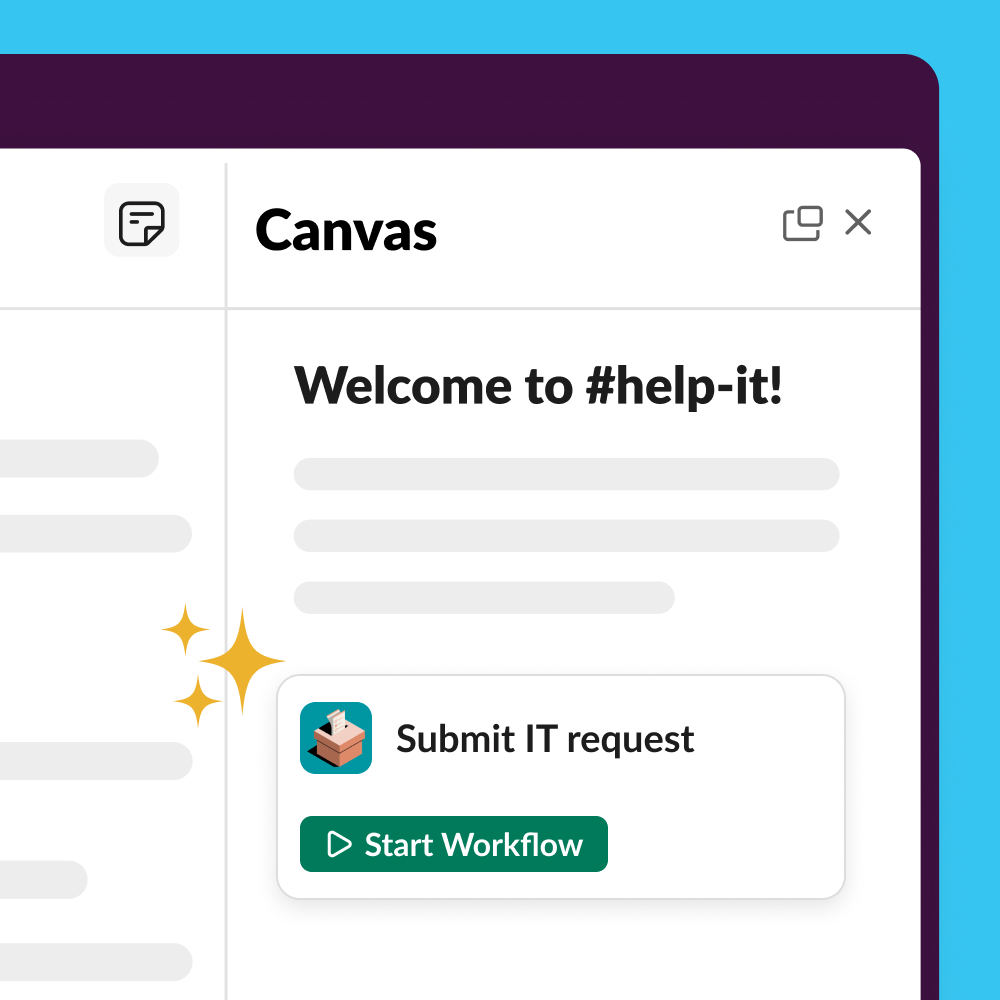
In Slack, distribution is a button: paste the workflow's link in a channel or pin it in a canvas, and it only works clicked inside Slack. Ours also answers to a sentence.
Routine retires; Workflow takes the chair.
The ratified glossary says Routine (deprecated synonyms: playbook · workflow). This document reverses that row — because the team wants Slack translatability, and because the code was never on the glossary's side: the data model has called these workflows all along.
| Word | Fate |
|---|---|
| Routine | Retired. A Routine becomes "a workflow with a schedule trigger." One release of dual labeling — "Workflows, formerly Routines" — then the old noun goes. The rail-playbooks testids finally die with it. |
| run | Survives unchanged. Still the metered unit and the history unit. Run 142 keeps its number. |
| checkpoint | Survives — and gains a job. It is the official translation of Slack's Button. |
| verified done · verified strip | Survives untouched. |
| test run | Survives. Canonical over "dry run." |
| workflow · playbook | The glossary row inverts: Workflow (deprecated synonyms: routine · playbook). |
Zero engine work — the engine's data model is already workflow (platform-definition.md §7). Existing Routines auto-render as schedule-triggered workflows; run history, checkpoint decisions, and verified strips carry over byte for byte. The cost is editorial: a same-day sweep of product-spec.html (glossary, T4.2, T5-E2), pricing.html (Free card, Team bullet), roadmap-deck.html, and roadmap-content.md.
The ai.com Workflow, defined.
A Workflow is up to 5 triggers, up to 100 sequential steps, and at least one checkpoint before anything external — the policy line the engine already enforces: external steps can never drop below one checkpoint unless workspace policy allows. Steps run in order; variables flow forward; runs are journaled end to end.
Eight triggers. Seven are Slack's, translated.
| ai.com trigger | Slack ancestor | Delta |
|---|---|---|
| On a schedule | On a schedule | Absorbs Routines entirely. Scheduled in plain language — "every Monday 8:00." |
| From a link or button | From a link | Works in Rooms, DMs, and the Command Center — not one channel. G3 |
| When asked in chat | none — ours alone | @agent "run the client report now." The conversational door Slack doesn't have. |
| When a message is posted | Message posted (keyword) | Keywords across one Room, several, or all. G3 |
| When a person joins | Person joins channel | A Room or the workspace — onboarding workflows in one place. |
| When a reaction is used | Emoji reaction | Kept 1:1 for translatability. |
| From a webhook | From a webhook | Inbound payloads are auto-clamped to a minimal tool profile before they touch anything. §4 |
| When a Connector event fires | List updated + connector triggers | Absorbs both Slack concepts. 13 connectors; events where each supports them. |
Up to five triggers attach to one workflow G2 — the Monday report can run on its schedule, on demand from chat, and from a webhook, without existing three times.
Four step categories. Slack's three, plus the one they can't build.
Workspace steps
Send a message · Ask with a form · Add to Room · Update Room · Set variables · Branch · Wait — minutes to months, or until a condition G9 · Loop over a list G5
Connector steps
The 13 connectors' actions — Jira, Gmail, Sheets, and the rest. Honest number: Slack has ~70+. The Agent step is how we live with that. G4
Agent steps
Hand the agent a sub-goal with tools, a budget, and success checks. It acts in systems with no dedicated connector, watches for replies, syncs both ways — and the maker/checker verifies the result. G4 G10
App steps
Slack needs a developer, the Deno SDK, and a CLI deploy. Here you describe a Skill in chat and App Builder builds it. No SDK, no paid gate.
The translated Button: custom text, restrict-to-people, expiry — but the decision is journaled. It survives a restart, survives an edit to the workflow, and expiry escalates to the owner instead of silently vanishing. Verbs are the house verbs: Allow once · Allow always · Deny.
Describe it; get a plan you can argue with.
Slack added AI generation to a form-first builder. We invert it: English is the front door, and the compiled plan is the contract — steps, sources, and checkpoints visible before the first run, editable on a canvas any Slack admin will recognize. This is spec T4.2, finished, wearing Slack's vocabulary.
Runs you can trust while you're not looking.
This is where the finished engine stops being an implementation detail and becomes the pitch. The engine is durable and journaled — closer to Temporal than to an agent loop. Every promise below is a property it already has.
Failure isn't fatal.
A failed step retries, pauses, DMs the owner, and resumes from the journal. Slack's run just ends.
Edits don't orphan runs.
In-flight runs finish on the version they started on. Pending checkpoints survive the edit.
History is evidence.
Per-run status, checkpoint decisions, verified strips — exportable, because audits happen outside the app.
Build one; watch it run in both worlds.
Compose a workflow — triggers, steps, Rooms, a failure if you like — and watch the same automation run as Slack would run it and as we would. The argument makes itself; you just pick the steps.
Who can build, who can run, what it costs.
Governance copies Slack outright — it's the part they got right. Pricing does not: there is no premium workflow class here. One meter, visible before the run.
Workflow managers
Edit, unpublish, delete. The builder is manager by default; managers add managers. Drafts are private until published.
Publish & permissions
Who can find and run it, who can copy it. An admin dashboard lists every published workflow in the workspace.
Templates
A proven workflow, installable by another team — checkpoints intact, secrets never included. The Library ships a CEO digest, a manager digest, an onboarding flow.
| Tier | Workflows | The meter |
|---|---|---|
| Free · $0 | 3 Connectors · 3 Workflows (word-swap of the ratified card — a five-trigger workflow counts as one) | Metered daily agent allowance · checkpoint on everything external |
| Team · $25/seat | All Connectors · unlimited Workflows · Rooms, Calls, Vault | Pooled workspace credits (≈$8/seat included) · a run is the unit · estimates before runs · admin spend caps |
| Command · $60/seat | Everything in Team | SSO, SCIM, audit export — self-serve |
The anti-G12 stance, spelled out: every step type is available on every paid tier. Adding a second connector step never changes a workflow's billing class — it just meters more runs against the pool, and the estimate says so before the run.
Twelve gaps: ten answered, one mitigated, one open.
The honest close. Two of Slack's weaknesses don't fall to architecture — they fall to time.
| ID | Slack's gap | Our answer | Status |
|---|---|---|---|
| G1 | No step-level testing | Test run — reads execute, external writes stubbed | Answered |
| G2 | One trigger per workflow | Up to five triggers on one workflow | Answered |
| G3 | Single-channel scope | Triggers watch one Room, several, or all | Answered |
| G4 | <100 connectors | 13 connectors + Agent steps that act where no connector exists | Open — mitigated, not erased |
| G5 | No loops | Loop over a list, first-class | Answered |
| G6 | Weak failure handling | Retry → pause → owner DM → resume from journal | Answered |
| G7 | Logs not exportable | Run history exports; every run carries its version | Answered |
| G8 | No versioning | Journal-backed versions; in-flight runs finish on theirs | Answered |
| G9 | Coarse delays | Wait minutes to months, or until a condition | Answered |
| G10 | One-way only | Agent steps watch and sync back, verified | Answered |
| G11 | Complexity cliff | English authoring + compiled plans flatten the curve | Mitigated — not immune |
| G12 | Premium billing surprises | No billing classes; one meter, estimated before the run | Answered |
Also unanswered by architecture: Slack's template ecosystem and years of admin muscle memory. T5-E2 templates are the plan; they need time and proof, not a spec.
What could break this.
- Glossary whiplash. The Routine vocabulary was ratified weeks ago. The flip needs a logged decision and a same-day sweep of the four affected docs, or they contradict each other.
- Multi-trigger and loops are unproven in the engine. The journal supports them in principle; deterministic replay of a loop over a changing list is real engineering, not renaming.
- The reaction trigger presumes Rooms ship emoji reactions. Confirm the surface exists before the trigger table goes public.
- Connector events are uneven. Which of the 13 connectors actually emit events? The trigger may launch honest at four or five.
- Agent-step cost variance. The anti-premium-surprise claim lives or dies on estimate quality before runs.
- "When asked in chat" needs a metering rule. When is a chat request a workflow run, and when is it just conversation? Users will find the seam.
- Free-tier counting. Three workflows — and a five-trigger workflow counts as one. Say it on the card, or the forum says it for us.
- Cross-workspace is out of scope. Slack Connect users will ask on day one; templates are the nearest story and should be positioned that way.
- The 100-step cap keeps Slack's complexity critique alive. English authoring mitigates it; it does not grant immunity. Watch real workflow sizes.
- Template secret-stripping depends on the Vault story. T5-E2's "secrets never included" must be demonstrable before the Library opens.